Custom statistics for Anki flashcard reviews
January 14, 2025
Anki's built-in stats page shows streaks and review counts, but it won't answer questions like "what's my median session length over the last 3 weeks?" or "how many seconds do I spend per card on average?". Fortunately, Anki stores a complete review log in an SQLite database, so you can run any query you like.
Exporting the data
- File → Export
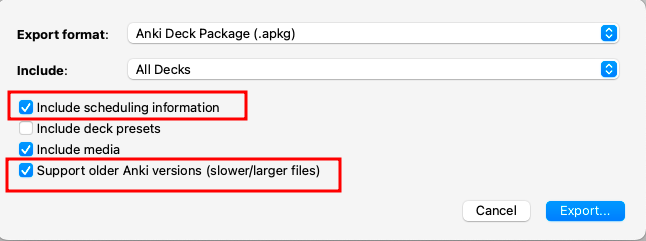
- Select Anki Deck Package (.apkg), then check Include Scheduling Information and Support older Anki versions
- Unzip the resulting
.apkgfile (it's just a zip archive) - Extract the review log into a CSV:
sqlite3 collection.anki21 -header -csv "SELECT * FROM revlog;" > revlog.csv
Note: Checking "Support older Anki versions" produces a
collection.anki21file. Without it you may getcollection.anki21b, which uses a different internal format.
The revlog schema
The revlog table has one row per review. The columns you'll use most are:
| Column | Description |
|---|---|
id | Review timestamp in milliseconds (also serves as a unique ID) |
cid | Card ID |
ease | Button pressed: 1=Again, 2=Hard, 3=Good, 4=Easy |
ivl | New interval after review (positive = days, negative = seconds for learning steps) |
factor | Ease factor × 1000 (e.g. 2500 means 2.5×) |
time | Time spent on the card in milliseconds |
type | Review type: 0=Learning, 1=Review, 2=Relearn, 3=Filtered |
Loading into pandas
import pandas as pd

df = pd.read_csv('revlog.csv')

# Convert the millisecond timestamp to datetime
df['datetime'] = pd.to_datetime(df['id'], unit='ms')
df['date'] = df['datetime'].dt.date
df['week'] = df['datetime'].dt.to_period('W')
Session summary statistics
Cards reviewed and time spent per day, with derived columns for minutes and seconds per card:
daily = (
    df.groupby('date')['time']
    .agg(['sum', 'count'])
    .rename(columns={'sum': 'total_ms', 'count': 'cards'})
    .assign(minutes=lambda x: round(x['total_ms'] / 1000 / 60, 1))
    .assign(seconds_per_card=lambda x: round(x['total_ms'] / x['cards'] / 1000, 1))
)

# Median over the last 21 days
daily.tail(21).median()
Custom percentiles
describe() only shows a fixed set of percentiles. Pass your own list to see more of the distribution:
custom_percentiles = [0.01, 0.05, 0.1, 0.25, 0.5, 0.75, 0.9, 0.95, 0.99]
df['time'].describe(percentiles=custom_percentiles)
This is useful for spotting outliers — e.g. cards where you walked away and left Anki open will show up at the 99th percentile with very high times.
Filtering by review type
If you want to exclude learning/relearning steps and look only at mature card reviews:
reviews_only = df[df['type'] == 1]